
Can I take money out of Coinbase straight to PayPal or another e-wallet?
A brief introduction
Can I withdraw money from Coinbase straight to PayPal or another e-wallet? This is a frequently asked topic by novice cryptocurrency users. In a nutshell, the answer is yes, but only for approved withdrawal methods and in specific nations.
Some customers of Coinbase are able to withdraw money straight to PayPal; however, assistance is contingent upon your region, the currency you wish to withdraw, and the status of your account verification. In general, Coinbase does not offer direct withdrawal options for other e-wallets like Skrill, Neteller, or Paytm.
It helps to know which choices are available, how to link your account correctly, and what errors might cause your withdrawal to be delayed if you intend to transfer money out of Coinbase.
——————–
Can I take money out of Coinbase straight to PayPal or another e-wallet?
For qualified users, Coinbase does indeed allow direct withdrawals to PayPal.
But there are crucial prerequisites:
- PayPal withdrawals must be accepted in your nation.
- Your Coinbase account has to be thoroughly validated.
- Your Coinbase legal name and PayPal account must match.
- It might be necessary to first convert some currencies to your local fiat currency.
In general, Coinbase does not provide direct cash-out assistance for other e-wallets.
In other words:
- PayPal is available in some areas.
- Other e-wallets are often not directly supported.
You will often need to take money out of your bank account before transferring it to another wallet if your preferred wallet is not mentioned in the Coinbase payment options.
——————–
How to transfer money from Coinbase to PayPal
The procedure is rather easy if PayPal is accessible in your area.
1. Access your Coinbase account.
Open Coinbase via the website or app, then safely log in.
2. Select Cash Balance or Assets.
If your money is still in cryptocurrency, pick the cryptocurrency you wish to sell.
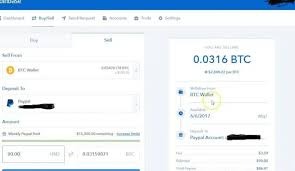
3. Turn cryptocurrency into money
Before making a PayPal withdrawal, you typically need to:
- Sell cryptocurrencies like Ethereum and Bitcoin.
- Transform it into the fiat money of your area.
4. Choose “Cash Out.”
Click the Cash Out option once your balance is shown as cash.
5. Select PayPal
PayPal will show up as a withdrawal option if it is compatible with your account.
6. Type in the sum
Enter the desired transfer amount.
7. Verify the withdrawal
Review:
- Fees
- Estimated time of arrival
- The total amount obtained
Next, verify the transaction.
——————–
How much time does it take to withdraw money from PayPal?
Withdrawals via PayPal are frequently quicker than those from banks.

In several instances, the funds may come in:
- Instantly
- In a few minutes
- Depending on review checks, it may happen in a few hours.
When PayPal is accessible, many users prefer it since bank withdrawals typically take longer.
——————–
Can I make withdrawals to other e-wallets?
No, usually.
Typically, Coinbase does not allow direct withdrawals to:
- Paytm
- Skrill
- Neteller
- Google Pay balance
- Prepaid digital wallets from PhonePe
Although they are not a direct Coinbase cash-out destination, some sites could nonetheless function in an indirect manner.
An alternate approach
If there is no support for your e-wallet:
- Transfer money to your bank account from Coinbase
- Move funds from the bank to the wallet of your choice.
It is the standard solution; it requires an additional step.
——————–
Advice before withdrawal
Remember these useful suggestions to ensure a more seamless withdrawal.
Check your identification as soon as possible.
Withdrawals may be blocked by Coinbase if your KYC verification is not complete.
Details of the match account
- Your name appears on:
- Coinbase bank account connected to PayPal
- should precisely match.
Verify the withdrawal costs.
Depending on your region and payment type, there may be costs associated with PayPal withdrawals.
Keep an eye on conversion rates.
Changes in market prices may have an impact on the amount of money you get if you sell cryptocurrency before withdrawing.
Begin with a small quantity.
Try a modest transaction initially if this is your first withdrawal.
——————-
Typical errors
A lot of withdrawal issues are caused by preventable mistakes.
1. Attempting to withdraw cryptocurrency straight to PayPal
PayPal withdrawals often use cash balances rather than raw cryptocurrency in many areas.
2. Making use of an unreliable PayPal account
PayPal accounts that are restricted or unverified may be rejected.
3. Disregarding local limitations
Some consumers believe PayPal withdrawals are accessible everywhere. They don’t.
4. Mismatch in names
Processing might be slowed down by even a minor spelling error.
5. Ignoring costs
After Coinbase fees or conversion costs, a withdrawal can appear lower than anticipated.
——————–

FAQ
1. Can I take money out of Coinbase and send it straight to PayPal?
Yes, but only if your account and country allow PayPal withdrawals.
2. Is it possible to transfer cryptocurrency from Coinbase to PayPal?
While conventional Coinbase cash-out to PayPal often entails withdrawing fiat money rather than just sending cryptocurrency, PayPal does enable cryptocurrency features in select countries.
3. Can I transfer money to Skrill from Coinbase?
No, direct Skrill withdrawals are often not supported by Coinbase.
4. Why does Coinbase not display PayPal?
Due to geographical limitations, problems with authentication, or unsupported currencies, it could not be accessed.
5. Is a PayPal withdrawal quicker than a bank withdrawal?
Usually, the answer is yes. Withdrawals with PayPal are sometimes substantially quicker than conventional bank transfers.
——————–